Showing posts with label Thanksgiving. Show all posts

Saturday, August 31, 2013

Give Thanks - September Stamp of the Month Blog Hop

Welcome to September's stamp of the month blog hop! If you're here from Jill's Scrap Wench blog, or if you're just starting out, you're in the right place. When  we're done here, let's head over to I Am A Happy Stamper and see what Dawn created for us this month.

Fall will soon be here and I am already getting excited for my favorite season! I love the cooler weather, the great outdoor photo ops, and all of the time we get to spend with family. So when I first saw this month's stamp of the month, I knew right away which stamp I was going to use first. The only real decision was what project to make with it first!


And it was absolutely perfect for this layout! I have to say that if every layout I made could be this beautiful, I would be the most happy scrapper in the world! Of course as usual I started with a sketch, this one from Volume 2 of Make It From Your Heart. I changed it up a bit to fit my pics, but the starting point of a sketch speeds up a ton! On to the details that make me love it so much:


Here is that wonderful stamp. To highlight my theme, I stamped it a second time in my contrasting color, made it into a little banner strip, and popped it up on 3-D Foam Tape.  I added some small sparkles (that came in the Huntington workshop on the go kit) to the ends of the banner as well.


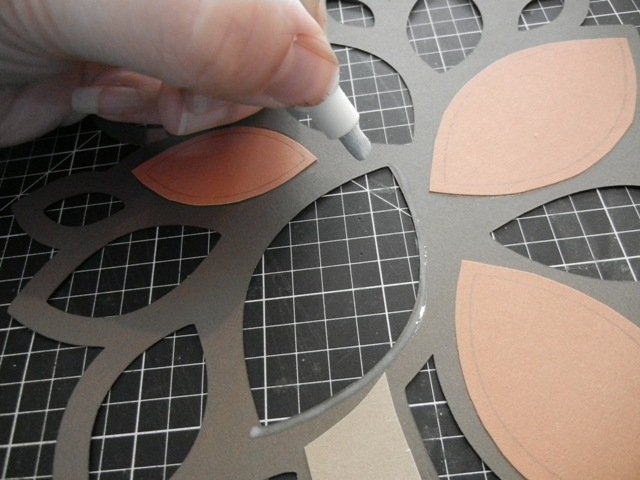
I cut this tree from the new Artbooking Cricut cartridge at Fit To Page, which cut the Cocoa brown outlines.  I then stamped on Desert Sand CS using Cocoa ink and the woodgrain stamp from the workshop on the go kit. I cut it by hand to near the size of the tree trunk, adhered the Cricut cut to it using the Bonding Memories Glue Pen, and cut it to size by hand. To see how I cut and laid out the leaves, be sure to check out my mini tutorial at the end of this post.  I added more Sparkles here because I kind of got hooked!


My title is also cut from the same page of the Artbooking cartridge, hand cut more leaves, and added more Sparkles and embellishments. I should point out here that I sponged the edges of all of my papers (except the leaves on the tree because the edges don't show) with matching inks and Sponge Daubers.


I made some photo corners using a punch I have in my horde of tools to pull in a little more of the pattern from the left edge of the layout. Then I tossed on some more leaves, Sparkles, and embellishments.

If you want to skip the tutorial, I'd love to hear what you think, then head on over to I Am A Happy Stamper and keep on hopping!

Now, how to do the tree leaves:
1. Flip tree outline upside down, placing your scrap paper underneath, and trace a leaf.

2. You should have this. Cut around  it, leaving a small border wide enough to glue with the glue pen and narrow enough that two leaves will not overlap.

3. Draw a thin line of glue around the open space of the leaf.

4. Glue leaf down so that pencil line faces you. That way if it isn't lined up perfectly, the line won't show on the front.

5. Repeat in a triangle pattern using different colors until tree is full of leaves. (See how I laid out 3 orange in a triangle pattern, then moved on to the red...)

I filled in the smallest leaves last, trying to make sure no leaves next to each other were the same color. This "random" effect is really a pattern, which makes it easier to achieve the random look we want.

If you're interested in knowing what products I used, here's a handy list (links open in a new window):
Thanks so much for stopping by! I'd love for you to leave me a comment before you go, then let's visit Dawn at I Am A Happy Stamper and see what she created.


Sunday, October 16, 2011

A Cricut Thanksgiving

Welcome!  I have another Cricut project for you today, using one of my favorite seasonal Cricut cartridges.  The Thanksgiving Mini cartridge is useful for all kinds of goodies.  So far this month I have made a pretty garland and some Thanksgiving helpers, and I'm sharing them all with you here.

First up, my leaf garland.  I have a grapevine tree in my kitchen; it's a bit like a Christmas tree made of grapevine, but it stays out all year long.  I just got it last year, so I am slowly adding to my stash of decor for it to wear.  This year I made a garland of leaves using the leaf cut on the Thanksgiving cartridge.


Using my Gypsy, I hid all of the interior cuts on the leaf so I was left with just an outline.  I then copied it multiple times on my virtual mat so I could cut several at once.  I pulled a variety of papers from my stash in Fall colors, including some colored vellum, some suede-finish paper, textured cardstock, and some American Crafts glitter paper in Leaf.  (I used a stamp pad to ink the back side of the glitter paper in case they flipped over some.)  After the leaves were cut, I used various colors of Stickles to add some swirly veins to the leaves.  Once the Stickles were dry, I punched holes in all of the leaves, then tied them onto some hemp cord a few inches apart. Then all I had left to do was wind it around my tree!

Next are my little Thanksgiving helpers.  Did you know that this cartridge comes with napkin ring and place card designs?  (In fact, the place card is useful for any occasion as it has a simple flourish design.)  Here's the napkin ring and place card design:

To fit my paper napkin & plasticware, I cut my napkin ring at 1", but I would definitely go larger for a cloth napkin or larger paper napkin.  They are easily joined together at the back with Scor Tape.  I cut the place card at 2.5", as well as the place card layer.  I cut the layer from black CS and adhered it to the card, then added Stickles to it.  I used Distressed Stickles in Scattered Straw, Spiced Marmalade, and Fired Brick.

When we celebrate at my parents' house, there are usually over 40 of us with an equally large amount of food.  It gets hard to keep track of what everything is, so I thought the place card would also make a great way to label the various foods:


Using my Gypsy again, I hid all of the interior cuts on the place card layer.  I copied it to a second one then resized the copy slightly smaller to fit inside and joined them together.  Then I selected the pie cut and fit it into the place card layer cuts and welded it there.  I also cut the pie layers at the same size as the pie.  After adhering the various layers to the place card, I dressed it up a bit.  I again used the Scattered Straw and Fired Brick Distress Stickles on the pie, and I added Frosted Lace Stickles to the steam.  I plan to make more with some of the other cuts on the cartridge to take with me so everyone can label their not-so-obvious dishes!

Thursday, September 30, 2010

Double Duty Holiday Decor

I love when things can serve more than one purpose, and my holiday decor is no exception.  I had just received my new Thanksgiving mini Cricut cartridge, but Happy Hauntings was still calling my name since I just haven't had a chance to use it as much as I'd like yet.  The solution was a fun little hanging sign from my stash.  (I tend to buy alterable items when they're on sale, and hoard them along with some recyclables to alter when the mood strikes.)

The plan was to decorate one side for Halloween, and one side for Thanksgiving.  I didn't want typical black & orange for Halloween, but some of the colors needed to be the same so I could add ribbon to the wire hanger for a more decorative look.  So, let's see how I did:


I'm going with a bit of an elegant vampire theme for Halloween this year, so I pulled this paper from my stash, traced the sign on it, and cut it out.  I decoupaged it to my sign and let it dry while I cut my Cricut Designs.  Using the Vampire font from Happy Hauntings, I cut "Beware" from American Crafts glitter paper in Rouge and the font shadow from black paper.  I cut the Bats using the Layer 1 feature for Frame 3 on page 40 of the handbook.  I added the red eyes using some Stickles in Christmas Red.  To adhere the shadow, I again decoupaged.  Helpful Hint:  I like to make my paper look like fabric by brushing on the first layer in one direction and letting it dry, then brushing on the next layer in the opposite direction.  The vertical and horizontal cross-hatching looks just like a fabric weave.  Once everything was dry, I added the pieces cut from glitter paper using Glossy Accents.

Now, for the Thanksgiving side:
Using the same process as the other side, I adhered this paper from my stash to the sign blank.  I cut this nice little Pilgrim couple on the Thanksgiving cartridge from black cardstock, using creamy white and deep orange for the layers.  After adhering them to the sign, I just cut off the excess from the "swirly" part that hung off the edge.  I cut the "Give Thanks" design from American Crafts glitter paper in Chestnut, and adhered it over the top of the Pilgrims.  Somewhere along the way I misplaced the dot for my "i" - since I didn't want to cut it again, I just pulled an adhesive rhinestone from my stash and stuck it on instead.

Finally, I tied ribbons and attached them to the hanging wire using Glue Dots Pop Up Dots.  I added a red button to the Halloween side and a deep orange button to the Thanksgiving side for a little color.

Supplies available at Cutters Creek: 
Other Supplies:
  • Creative Imaginations bare elements Brenton oval sign
  • My Minds Eye papers from The Spider's Web line
  • Adhesive rhinestone
  • Ribbons and buttons
  • Mod Podge, matte finish
  • Black craft paint (to finish the edge of the sign), optional

Saturday, September 11, 2010

Thanksgiving Card

Using my new Thanksgiving mini seasonal cartridge for my Cricut.  Bought mine at Cutters Creek!  Papers are CTMH from my stash (read: no longer available), with CTMH inks & CS.

Related Posts Plugin for WordPress, Blogger...